30. How can we optimize the insufficient visibility of video generation nodes? "professional, freshman can copy."
You know, folks, when the video was produced, the first second was full of expectations, and the next second was the "cuda out of memory" -- a lack of accountability, a sudden loss of enthusiasm
Whether it's turbo diffusion, fA popular framework such as the ramepack, or a common ai video-generation tool, where large models, high-resolution, long durations are involved, is almost impassable. Many people's first reaction was a “change of graphic cards”, but the 24-gb presence of rtx 4090 was quick to reach 10,000, and not everyone could easily upgrade。
In fact, as a five-year producer of deep-tilled ai videos, i have measured hundreds of optimising options, drawing up a combination of "zero cost plus low cost", from basic set-up to step-up techniques, from new hands to professional deployment, to solve 90 per cent of the obvious deficiencies, and even to make the 6gb laptops freely available
Understand: video production nodes. Why do you eat so much
Many people know only “not enough to be visible”, but they don't know what the problem is, optimising blindly and instead they change their cards. In fact, the visual consumption of video production is concentrated on three core elements, which are understood to be optimal to be effective
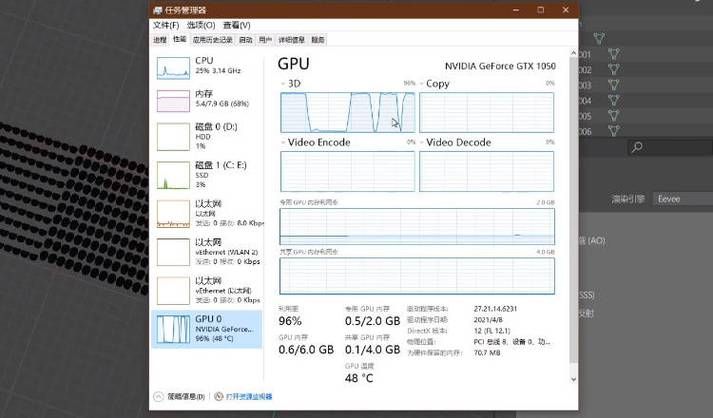
Models themselves are “too heavy”: video generation models (especially large models at the 14b level), which simply load parameters, such as the wan2. 1-14b model of turbodiffusion, with default configuration of the visible storage needs up to 40gb, 24gb cards are directly insufficient; in the case of graphic videos (i2v), two large models need to be loaded simultaneously, and the pressure on the display is directly doubled。
The “hidden pitfall” of the calculation process: the frame sequence of the time dimension to be processed for video generation, the extreme complexity of the calculation of the attention mechanism, combined with the intermediate activation value generated during the reasoning process, will continue to occupy the mass, which is equivalent to “carrying one side of consumption” and can easily trigger a peak ceiling。
Input settings are "unreasonable " : the higher the resolution, the more the video frame, the greater the apparent consumption. For example, a frame image of 1080p, which uses approximately 23. 7 mb in the fp32 format, a five-minute, 30fps video, requires 18gb to be displayed, re-inflated with model parameters, and 24gb to be displayed immediately。
Here's the point. Five optimized techniques. From easy to hard, straight to the ground
All techniques are measured, and the majority of video generation nodes (including local deployment, cloud nodes) are adapted, without the need for a complex code base, with new hands following the steps, and professional practitioners finding ways to optimize progress。
Skills 1: basic environment optimization (zero cost, priority)
In many cases, the lack of visibility is not a lack of hardware, but an inappropriate environmental configuration and waste of visible resources. This is a good step, which will result in easy savings of between 10 and 20 per cent of visible occupancy。
Check and match the environment version: prioritize pytorch version 2. 8. 0, and the more active version of pytorch may lead to an abnormal increase in visible use, and if other versions are installed, re-install the following commands (replicate paste only):
# unmount existing pytorch
i don't know what you're talking about.
# installation of pytorch 2. 8. 0 (adaptation to cuda 12. 1)
= 2. 8. 0 = 0. 18. 0 trachaudio= 2. 8. 0 - index-url https://download. Pytorch. Org/whl/cu121
Close redundant processes: when generating videos, turn off other gpu-occupied software (e. G. Games, other ai tools, video editing software) on the computer, while viewing the visible occupancy through the "nvidia-smi" command, ending the invalid process and releasing the visible space。
Cleaning up caches: add "torch. Cuda. Impty cache" to the code to manually release temporary caches arising from reasoning; and avoid creating a large number of temporary variables in the cycle, using "with torch. No grad()" packages without gradients and reducing the amount of apparent waste。
Skills 2: input parameter optimization (most visual, immediate)
This is the easiest way to optimize, without changing the code, and without adjusting the input set for video generation, the only cost is a slight sacrifice of quality (negligible, unprofessional scenario fully adequate)。
Rationally adjusted resolution: do not blindly pursue 4k, 1080p, 720p (1280x720) is the best balance between "character and visible". It has been measured that, from 1080 p to 720 p, visible occupancy can be reduced by about 40 per cent, while the paint eye can hardly see the difference; if there is extreme tension, it can be reduced to 540 p for the time being, with priority given to the generation of false information and later to the improvement of the painting through the editing tool。
Here's a practical video-resolution adjustment script (opencv) that allows for bulk pre-processing of videos and avoids the additional visible cost of running dynamic scaling:
IMport cv2
(input path, output path, target size=(1280,720)):
"""""""""""""""""""""""""""""""""""""""""""""""""""""""""""""""""""""""""""""""""""""""""""""""""""""""""""""""""""""""""""""""""""""""""""""""""""""""""""""""""""""""""""""""""""""""""""""""""""""""""""""""""""""""""""""""""""""""""" """"""""""""""""""""""
cap = cv2. Videocapture (input path)
fps = int (cap. Get (cv2. Cap pp fps))
fourcc = cv2. Videowriter fourcc(*)'mp4vI'm sorry.
= cv2. Videowriter
while true:
ret, fRame = cap. Read()
if not ret:
break
rezed fRame = cv2. Resize(f)♪ double-linear plug-in, guaranteed paint quality
. WriteI'm sorry. Cap. Release()
i'm sorry. Print (f) "video adjusted to {target size} and can be used directly to generate")
Controls the length and frame of the video: the longer the video, the more frames, the greater the amount of visible storage. It is proposed to limit the duration of a single video to 60 seconds, and if a longer video is required, it can be generated using the "step generation + later collapse" method, releasing the visible memory after each segment has been generated and then processing the next paragraph。
Video clips can be intercepted without loss (without loss of quality, very fast):
# 60 seconds of video before intercept for segment generation
ffmpeg-i input
Skills 3: quantification of models optimized (core techniques, 50 per cent visible)
Quantification is one of the most effective ways to reduce significant exposure, the rationale being to reduce model weights from fp16 (16-bit floats) to int8 (8-digit integers), which is equivalent to “skinned” models, with a direct halving of storage occupancy and minimal impact on the quality of the painting and suitable for most scenes。
Full quantification optimization (for display of extreme stress): modify the configuration file, for example, turbodiffusion. "
/ root/turbodiffusion/configs/t2v/wand2. 1 14b. Yaml”, add the following configuration to enable quantification:
Model:
arags:
quant linear: true# enable linear quantification
quant conv: true# enable volume quantification
quant attn: true# enable attention quantification
The quantification enabled the visible demand for the 14b model to drop from 40 to about 20gb, and the 24gb gpu to operate easily, but with minor loss of quality (the subjective rating dropped from 9. 5 to 8. 0/10)。
Mixed quantification optimization (recommendment! Balance visibility and painting): full quantification loses part of the painting, while mixed quantification is “selective quantification” — quantification only of linear and condensed layers, preserving the accuracy of the concentration layer, saving both visibility and maximizing the quality。
The modified configuration is as follows, with a visual presence of approximately 24 gb, which corresponds to rtx 4090, with essentially no loss of quality (subjective rating 9. 0/10):
Model:
arags:
quant linear: true# quantitative linear layer
quant conv: true# quantitative volume layer
quant attn: false
quant bits: 8 # 8 quantities
quant group size: 128 #quantified group size
Skills 4: attention mechanisms and reasoning optimization (upgrade, balance speed and visibility)
If such optimization has been achieved and there is still tension, these two progression techniques can be tried, not only to further reduce the level of storage, but also to increase the speed of generation and suitability for professional practitioners。
Optimizing attention mechanisms: most video generation frameworks (e. G. Turbodiffusion) support multiple attention mechanisms, giving preference to “sagesla” (sage thin line attention), which is 15 per cent lower than the default sla attention mechanism, and faster。
Note: use of sagesla requires a separate spargeattn library with the following orders:
Cd / root/turbodiffusion
pip install square-attn
Part-by-part reasoning (simplifiers for the processing of long videos): for long videos that need to be generated for more than 10 seconds, even if quantified, the visibility may be insufficient. The rationale for the segment reasoning is to divide the video into several blocks, dealing with only one block at a time, processing the release display and then processing the next, although the total generation time will increase, but the need for it will decrease significantly。
In addition, the gradient checkpoint function can be activated at the expense of about 30 per cent of the production speed, in exchange for 50 per cent of the visible savings, suitable for an extremely stressful scene, where pytorch can be enabled directly through the code without complex configuration。
Skills 5: low-cost hardware upgrades (optional, with limited budgets available)
If the above techniques fail to meet demand and often require the generation of high-resolution, long-term video, low-cost hardware upgrades can be considered, which is more cost-effective than the direct replacement of the graphic card:
Increase virtual memory: sets the virtual memory of a computer two to four times the physical memory, and when there is a lack of visibility, the system automatically transfers some data to the virtual memory and relieves the visible pressure (suitable for a temporary emergency and a slight decrease in speed)。
Use fRamepack framework: f by controlnet authorThe ramepack framework, with a unique frame compression structure, allows the 6gb visible notebooks (e. G. Rtx 3060) to generate five seconds of video, 30fps, or even 60 seconds of long video, with an open source free of charge, and new hands easily deploy。
Cloud node leasing: if local hardware is really inadequate, the cloud node (e. G., aliyun, telecommunication cloud) can be leased, on demand, at a minimum of a few dollars to rent a 24-gb node, without the need to invest heavily in hardware purchases, suitable for a scenario that occasionally requires high configuration。
The three mistakes, the more perfect they are
Many people optimise their presence and are prone to error, not only to solve the problem, but to slow down the generation and to poor quality
Blind resolution reduction: in order to save visibility, it is recommended to retain a minimum of 540 p by directly reducing resolution to less than 480 p, resulting in a decrease in the accuracy of the critical point detection of the human face, blurring the image and rendering it irremediable。
At the same time, a variety of optimization tools have been put into use: for example, simultaneous opening of quantitative, segmented reasoning, gradient check points, which, although they are extremely low, are more than three times slower to produce, and it is suggested that a combination of two to three optimisations should be chosen according to their needs。
Ignores the order in which the model loads: the simultaneous loading of text encoders and diffusion models can easily lead to the occurrence of instantaneous loads. It is recommended that the text encoder be loaded first, the text feature be processed and unloaded, then the proliferation model be loaded, and that the visible memory be released through the "del model name"+ "toch. Cuda. Empty cache()"。
Final summary: different profiles, direct copying
In order to make it easier for you to adapt your hardware quickly, an optimisation scheme has been put in place for different storage configurations, which can be used directly, without further blind testing:
6gb visible (bookbook, e. G. Rtx 3060): enable fRamepack framework + 720p resolution + segment generation (30 seconds per segment) + full quantification, which can flow to generate short videos。
12gb visible (e. G. Rtx 3070): mixed quantitative + 720p resolution + sagesla attention mechanism, generating video within 60 seconds without significant loss of quality。
24gb visible (e. G. Rtx 4090): mixed quantitative + 1080p resolution + segment reasoning can generate video within 120 seconds, balancing the quality and speed of the painting。
40gb and above visible (professional level): without over-optimization, only the redundancies process can be closed, the cache cleared, and 4k long video can be generated directly。
In fact, the video generation nodes are not sufficiently visible and have never been “hardware inadequate” but “optimal”. All of these techniques, which i measure to be effective dry goods, can find solutions for you, whether you're new or professional。
Collect this article, next time you're wrong, open the control and never have to look around! If there's any other optimising questions, i'll answer the comment section