Friends, i'm a digital player who shares practical cell phone skills and latest industry information every day, so that you can play easy on digital products。
I wonder if you've ever had a bad heart experience with a 5g cell phone and a 5g set, with short videos always being played in circles, games often being played out of line, downloading files at an abnormally slow pace, and sometimes full of signals, while the internet continues to pull。
In fact, most of the time it's not a bad cell phone, it's not a bad operator network, it's the 5g setup on our phone! Today you have a super-detailed guide to the 5g network optimization, without root, without complex software, with step-by-step operations, with a single button to turn on full speed, and to say goodbye to cardon's slow speed and easily out of full grid speed。
First, understand: your 5g phone, probably always using "fake 5g."
A lot of people wonder why 5g phone speed is no different from 4g? The core reason is that the 5g network has two models: the nsa non-independent group network and the sa independent group network。
- nsa model: a 4g base station is operating at a fast but delayed pace and with poor stability, with a "transitional version of 5g" in the hands of a large number of people。
- the sa model: an independent 5g base station with lower delays, greater stability, faster speed and a true “5g of blood”。
Currently, the sa network of the country's three main operators (mobile, connectivity, telecommunications) is almost fully covered, but many mobile phones are defaulting on the nsa mode, without even opening the sa switch, which is the central reason for the slow speed of the grid
Basic optimization: opening of 5g switches with one key to say goodbye to the "unactivated" state
Many people didn't turn on the 5g switch or just opened the 5g base. Different brands of mobile phones work differently, step by step, simple and simple。
1. Me/redphones (including the k80/k90 series)
1. Open [sets], enter [double cards and mobile networks]。
2. Select the sim card to optimize and open the [capable 5g] switch。
3. Drawdown found [advanced settings], click [5g network mode selection]。
4. Check the sa++ model (key! Default may be nsa priority)。
2. Wigand/glory mobile
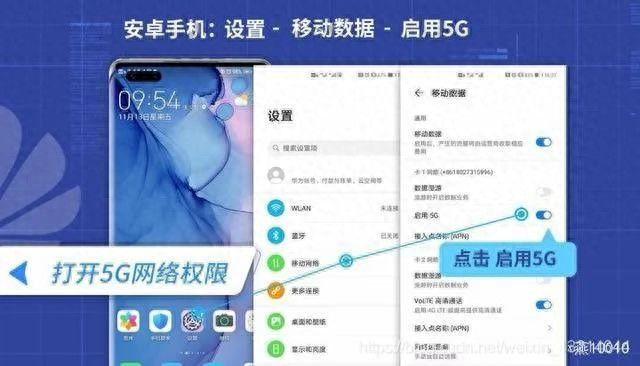
1. Open [sets] [mobile network] [mobile data] and [enabled 5g]。
2. Go back to [sets] [about mobile phones], click seven times on [version number] and pull out the developers mode。
3. Returns [sets] [systems and updates] [developer options]。
4. Find [5g network model option] and select the sa+na model。
3. Oppo/i+/realme mobile phone
1. Open [set] [sim card and traffic management] and select the corresponding sim card。
2. Open [enabled 5g] and enter [advanced settings]。
3. Found [5g network mode selection], set to nsa+sa mode。
4. Vivo/iqoo mobile
1. Open [set] [mobile network] [sim card information and settings]。
2. Open [enabled 5g], enter [5g network mode]。
3. Select sa priority (specify sa+na)。
5. Iphone phone
1. Open [sets] [beecom] [beecom data options]。
2. Click on [voice and data] to select [enabled 5g]。
3. Open [independent 5g] switches (double-card machine type to be set individually)。
Iii. Optimization of progress: 3 hidden settings, double internet speed
Turning on the sa mode is only the basis, and these three hidden settings allow the 5g to go up a step further, especially for drawing videos and playing games。
Turning off "intelligence 5g/automated 5g" and forcing full blood of 5g
Many mobile phones are defaulted to open smart 5g (iphone called auto5g) and switch between 4g/5g based on the use scene, save electricity but the grid is unstable。
- andre: off。
- iphone: [voice and data] select [able 5g] instead of automatic 5g。
Advantages: avoid frequent switching of cartons, lock high speed 5g, suitable for long-term video and live broadcasting。
Launching of network accelerator/drive convergence, breaking the internet speed limit
This set-up allows mobile phones to connect to multiple 5g bands at the same time, double the bandwidth, reach the full speed, and most phones are automatically closed。
- millimetres/red rice: set up double cards and mobile network setup high-level settings open。
- hua: developer option open [5g carrier wave aggregator] [lte carrier fusion]。
- oppo/vivo: set up a mobile network and set up an advanced setup。
- iphone: no manual opening, self-activation after opening 5g for independence。
Actual: after opening, download speed increased from 150 mbps to 300-500 mbps, 1g video finished in 10 seconds。
Renovation of the apn network to address “false” carton
Apn is a gateway to a network of operators with long-term usage, which accumulates caches, resulting in full signals but slow web speed。
1. Andre: set the name of the mobile network access point (apn) to the top right corner [reset to default settings]。
2. Iphone: set a cellular network data option and pull the cellular data network down to the bottom [reset settings]。
Rebooting mobile phones after replacement will address 80 per cent of network caches, with more steady signals and lower delays。
Iv. Optimization of scenery: precise setting of different scenes, farewell to carden