


Many users now prefer to use the wifi function on the internet, which is both convenient and free of mobile phone traffic. Some users want to beThe notebookHow do we set this up? Right now, it's a notebookWin 7The system provides an example of the specific operational steps to set up wifi hot spots in the notebook。
The operational methods are as follows:
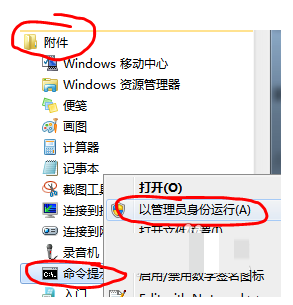
First, confirm that your wireless card is available. In the start menu, you can find " all programs " -- " attachments " -- " command prompts " , and " running as administrator " right. As shown in the figure below:
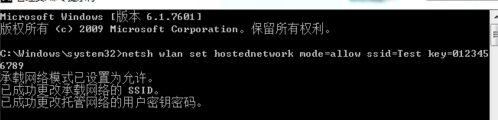
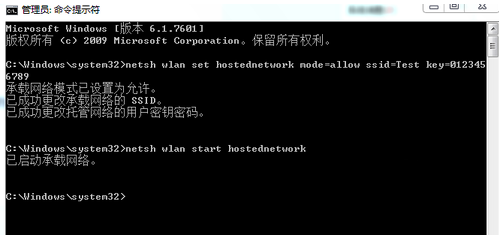
2. Enter "netsh wlan set hostnetwork mode=allow ssid=testkey=0123456789" in the "command alert" and return the system to automatically virtualize a wifi hotspot, as shown in the figure below:
3. At this point in time, open the network and the shared centre and click on the change adaptor settings on the left, as shown in the figure below。
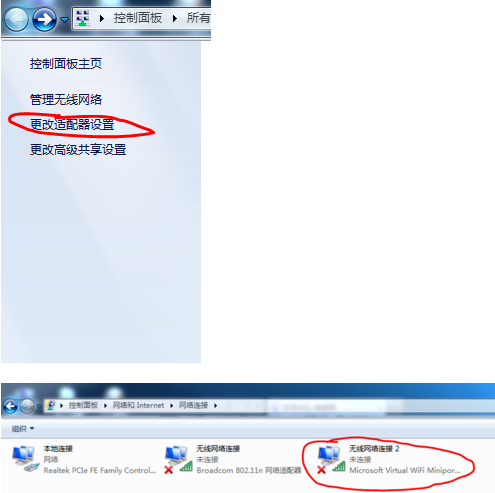
4. Click right on local connection and click properties, as shown in the figure below:
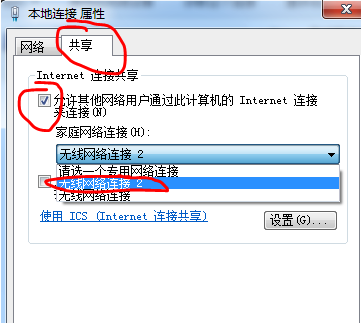
Toggle to share, tick in the first box and select wireless connection 2 in the bottom selection box. As shown in the figure below:
6. Enter "netsh wlan start hostnetwork" also in the command prompt, and return to the car and open the wifi hotspots, as shown in the figure below:
7 enter "netsh wlan stop stopped networkwork" in the command hint and return to the car and close the wifi hotspot. As shown in the figure below:
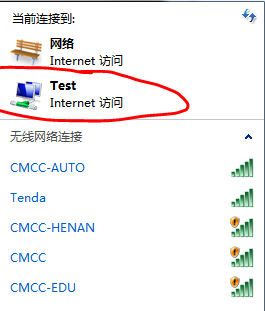
Additional description: “ssid=” followed by the wifi hotspot name, “key=” followed by the password, which must be eight or more。
Users in need may wish to refer to the approach described in this paper to turn on or off the wifi hotspots, if you have any other questions or would like to know more about the system, and to welcome attention to the small fish one-key reload system network。


