


The business mailbox is one of the most important channels of communication between foreign trade enterprises and their foreign clients. E-mail is also a business transaction tool used by most countries in the world, especially developed countries in europe and the united states. So it is self-evident that a good business mailbox can play a role。
Basic knowledge of business mailboxes
We're referring to a business mailbox with your own domain name
Photocopied
I don't know. And like
Photocopied
Photocopied
Waiting for the mailbox is a generic mailbox. Business mailboxes are more credible than general ones. Especially when you're doing well on your own station, you can do 1+1>2 in marketing your customers。
A domain name may correspond to only one mailbox service provider. When your domain name abbc. Com is already registered in the business mailbox in ariyun, you can't simultaneously register another business mailbox service provider (e. G. Google, internet, telecommunication cloud, etc.). So it's important to choose a post office provider that is best suited to its own。
Of course, if you think the registered mailbox service is bad, you can switch the business mailbox to the new mailbox service。
3. For foreign-trade enterprises, the delivery rate of mail should be our primary concern. There are a number of factors affecting the delivery of mail, and in other cases, under the same conditions, the mail delivery rates vary from one brand to another。
4. All e-mail accounts under the same domain name share one degree of authority. If an operator does not regulate the use of mailboxes and sends out development letters in random groups, this could have a negative impact on all mailbox accounts under domain names. It is therefore necessary to train any employee who has access to an enterprise's mailbox on basic use。
The advantage of google enterprise mailbox
The advantages of google business mailbox include the following:
All of the above advantages have been combined into one result — the highest delivery rate in google enterprise mailboxes。
Google enterprise mailbox has one and only shortcomings, which are expensive. The monthly cost of using a single mailbox is six times higher than the annual cost of 80 yuan in the mailbox of the ariyun enterprise. It would even be possible to apply free of charge for a business mailbox in ariyun, free of charge and suitable for start-up businesses to use for small volumes of business communication。
As an old foreign trade, i currently use business mailboxes such as google enterprise mailbox, ariyun enterprise mailbox, elite cloud enterprise mailbox and 263 enterprise mailbox. Google enterprise mailboxes are used to send development mail and other mailboxes are used to mount stand-alone stations and foreign trade platforms for client business communication。
Google business mailbox registration step
Preparation:
The interface between the registration steps of google business mailboxes is often adjusted, but in general it is in the same direction. If you register the picture wrong according to the following steps, please check the steps before and after。
Registration steps:
1. After scientific access, enter the registered address of google enterprise mailbox and click on it. It is sufficient to recommend a primary plan。
Currently, the registered google business mailbox has a 10 per cent discount and, if necessary, a two-dimensional code plus light-year tweet. (cancelled)
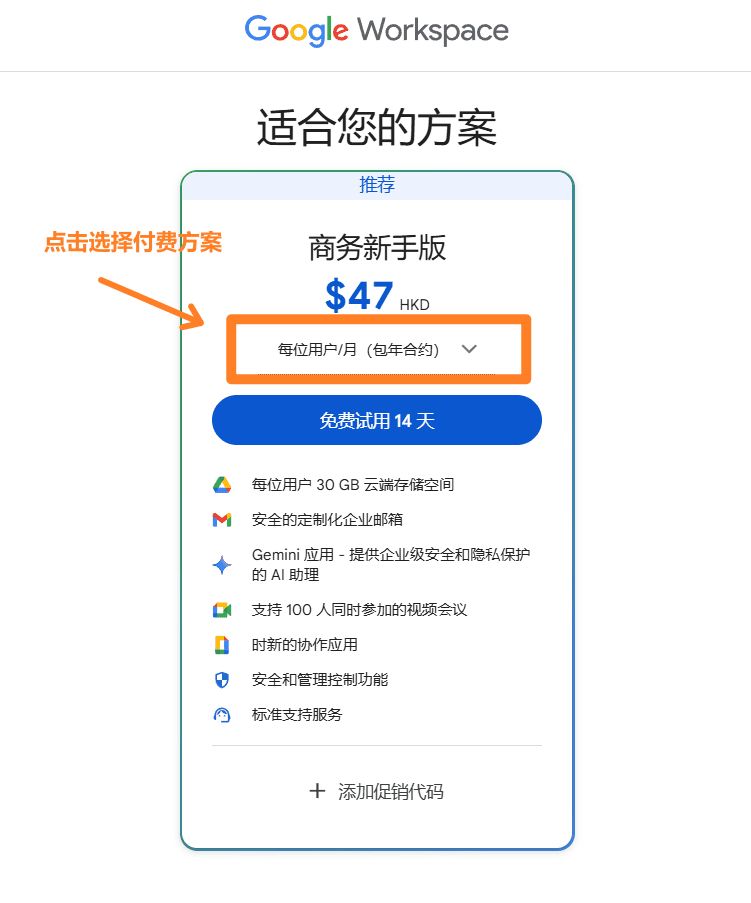
2. After clicking on the google enterprise mailbox registration interface, the payment option is first selected. Here i suggest a six-dollar one-month start-up package. The more costly options are mainly changes in cloud storage space and the upgrading of videoconferencing powers, which is not significant for us foreign traders。
If you see the interface not in united states dollars, but in other currencies, such as taiwan dollars and hong kong dollars, it's because of your access to science. It doesn't matter. Just choose the business standard formula. Promotion programmes can also be upgraded or reduced at any time if they are to be promoted。
3. Fill out basic company information. The name of the company, the number of employees, and the number of employees are not in question. I usually choose hong kong. I don't know, i haven't tried。
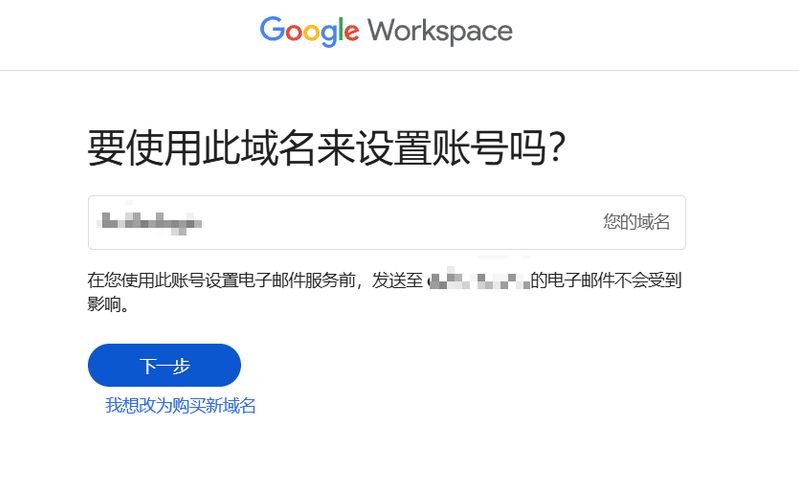
Enter the domain name you want to apply for the business mailbox. This display shows my current e-mail address, which leads to the mistaken assumption that you want to enter an existing e-mail address。
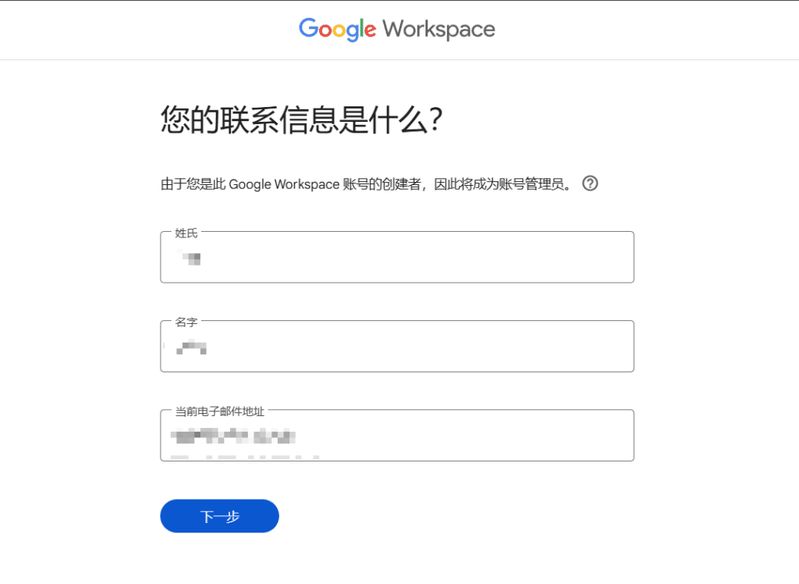
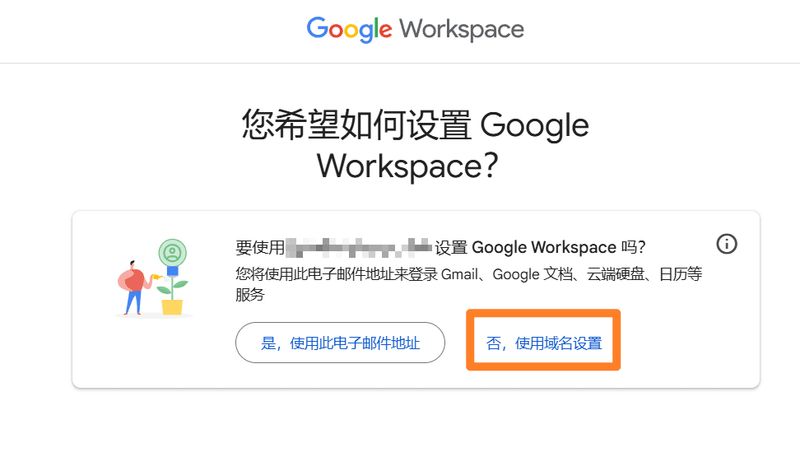
4. Select [no, use domain name settings]. Because we're using a new domain name to register the mailbox, we're using the domain name to set up the google workspace.
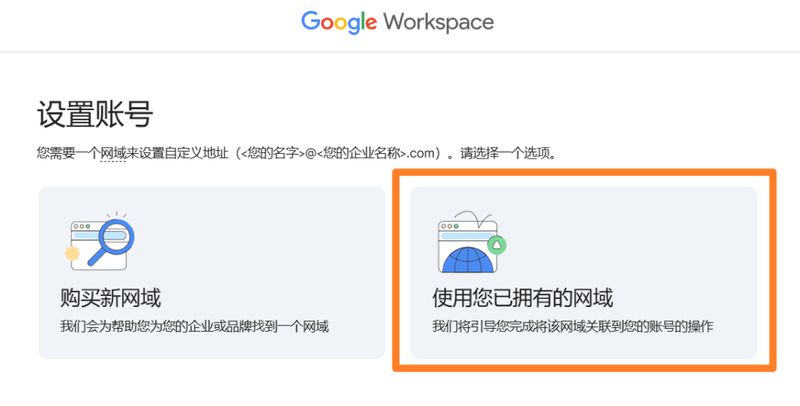
5. It is recommended that domain names be registered in advance and that you select [the domain you already own]。
Enter the domain name you want to register the mailbox。
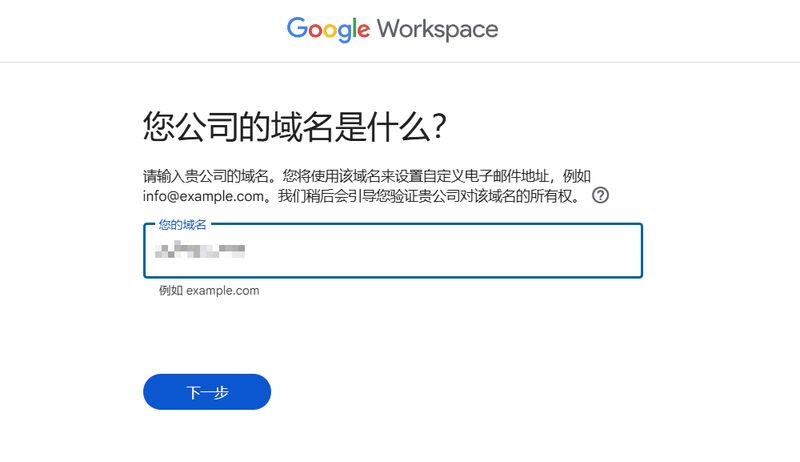
7. Reconfirm the domain name you entered。
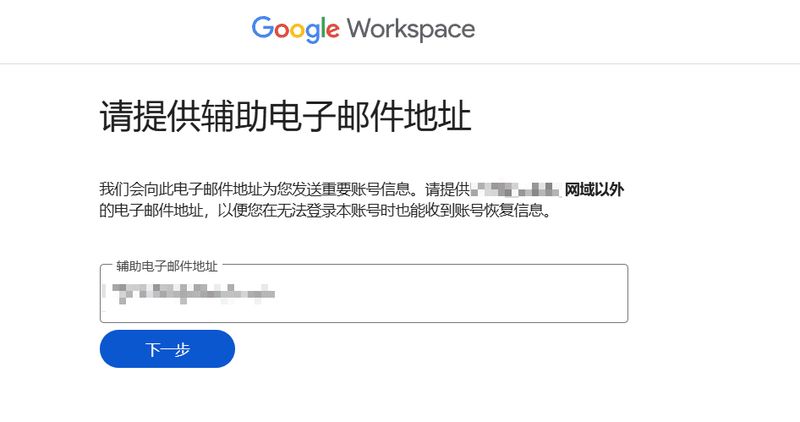
8. Fill in an auxiliary mailbox to help you recover the mailbox and password if you encounter a security problem. Here you can fill the qqbox。
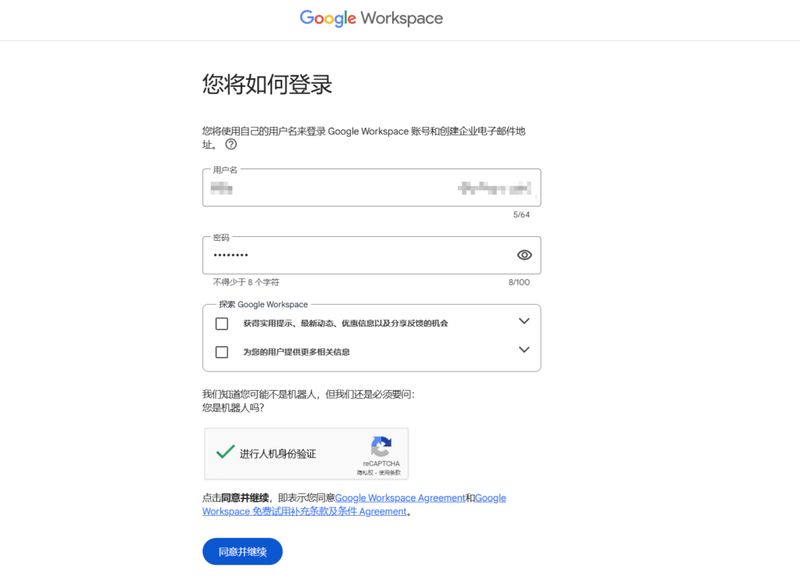
Set up your e-mail prefix and password. I don't want to check the google workspace two because i don't want to get marketing information. Set a later point of agreement and continue。
Mailbox prefixes suggest the use of your english name, not info, sales, etc., which affects mail delivery (reading: 14 techniques allow your mail delivery to surge) and response rates。
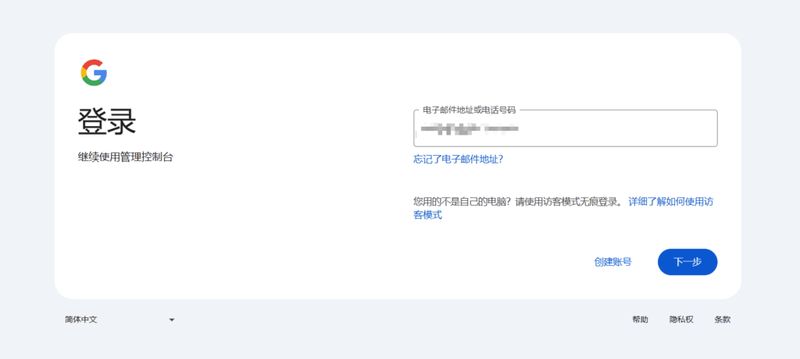
10. Access to the back of the management of google enterprise mailbox using the installed mailbox name and password。
11. Tie cell phone numbers. Cell phone numbers may be continental, but not too many google business mailboxes should be tied to a cell phone number。
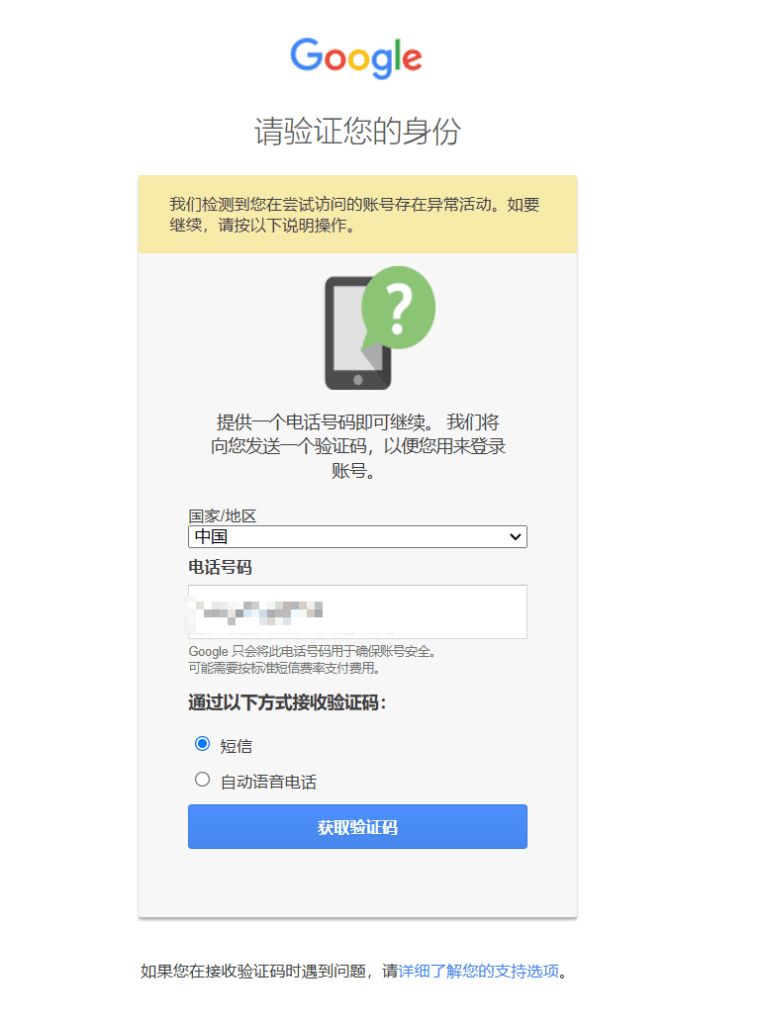
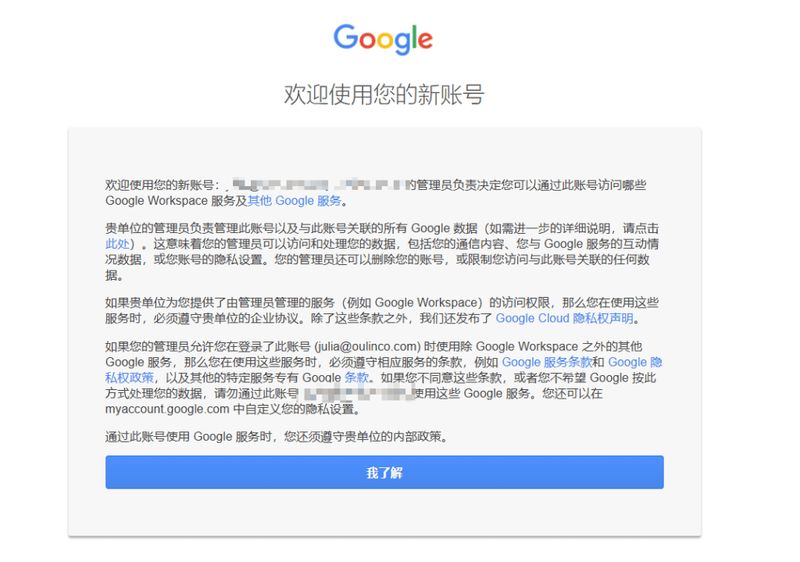
12. Click to confirm service terms. There's nothing to say. Click directly。
13. Selection of payment options. Annual payments are less expensive than monthly payments, both once a month, but users of the annual payment programme charge a full year directly if they cease to use mailbox services。
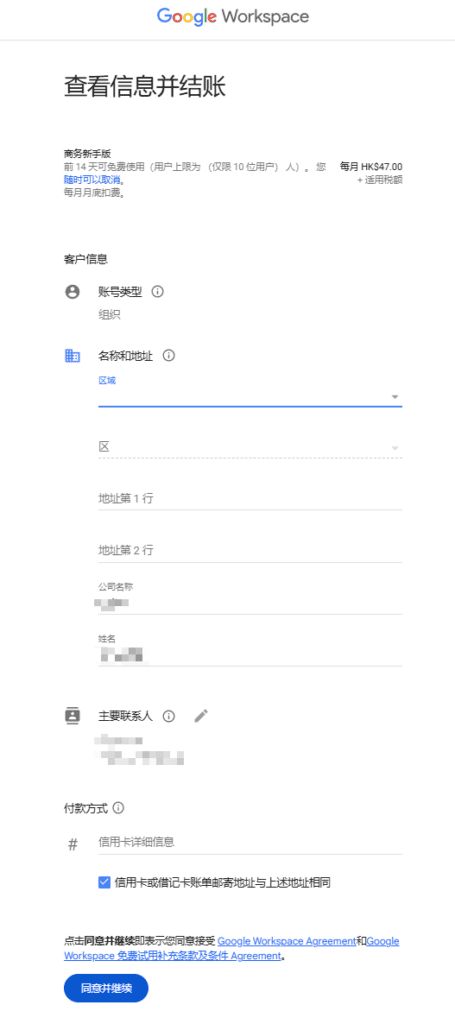
14. Fill in payment information. The company's name and address can be filled in at will, as google itself does not issue tickets。
Credit cards must be visa credit cards that support offshore payments。
In this case, please do not disclose your credit card information to anyone else. The theft of credit cards abroad has become an industry. A lot of foreign consumption is that you can steal your credit card if you have information on your card. You don't need to enter a password or verify a cell phone。
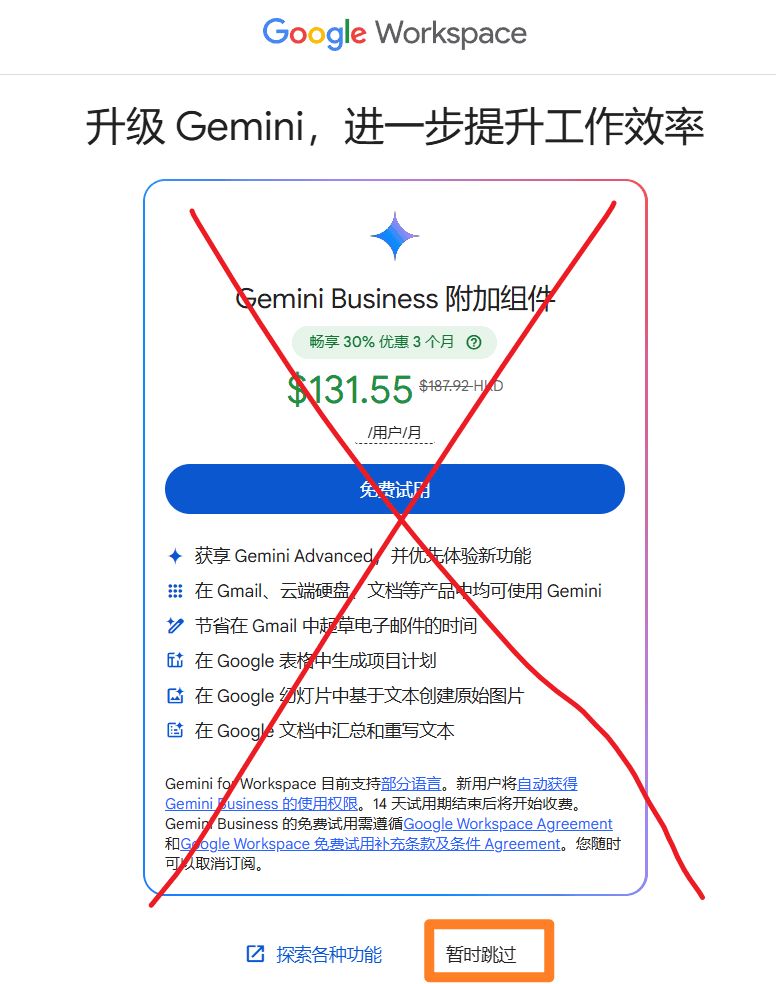
15. It is important to note that no additional services are provided and that direct clicks are made on [temporary skipping]. Many of the small partners are not paying attention here and clicked on a free trial, which will be subject to deductions。
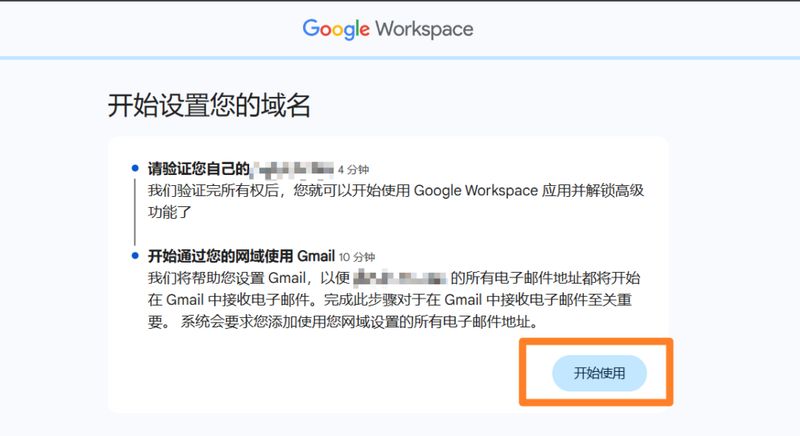
16. Steps to enter a valid domain name, click [starting]。
17. If the decryption of your domain name has been transferred to the cloudflare platform or to another hosting service, then you can click [on the cloudflare] or the corresponding hosting service provider for automatic validation. If not, click the left button. You probably don't know what claudflare is for those who come to the audience, so there's no need to look。
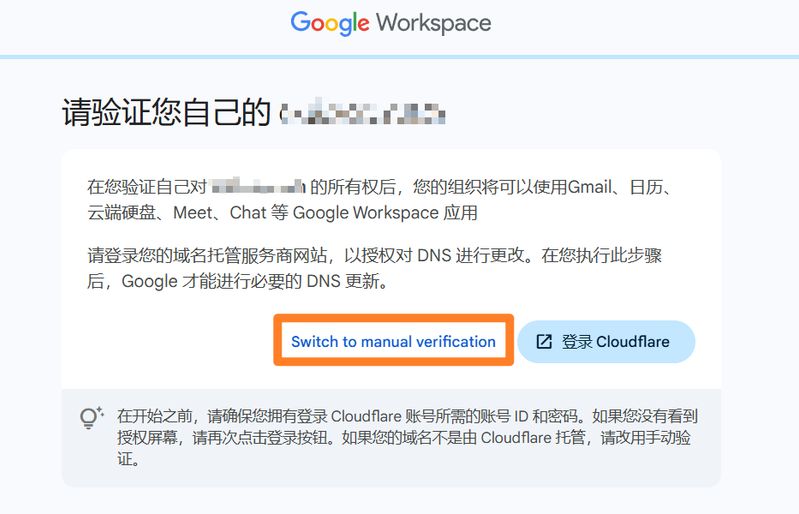
18. Whether or not you have a hosting service, please follow the instructions in the chart below. The use of hosting service providers for automated validation often leads to errors in interpretation for unknown reasons. When you have an error, you have to resolve it manually and reset it。
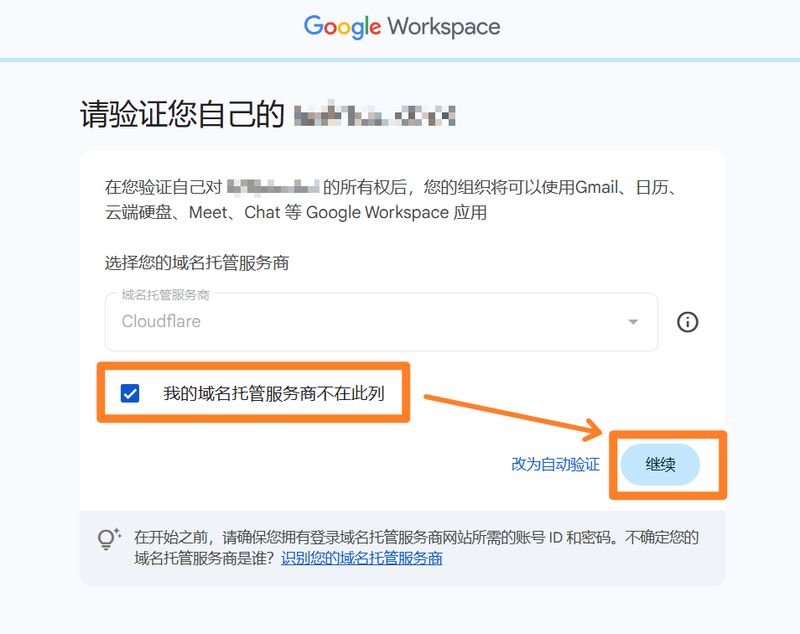
Next, google will give us a txt analysis. We need to add this to our domain name。
Make sure your domain name is registered with a service provider, like my domain name is registered with aliyun, so i'm going to log in to aliyun. The parsing panel of the domain name found。
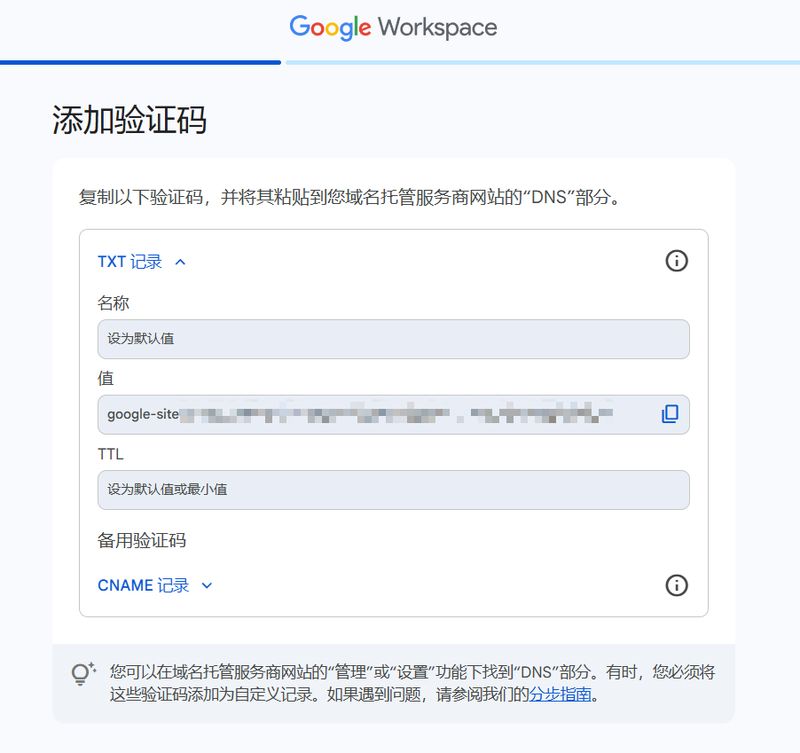
20. Add the domain name that google gave us in the domain description interface。
Note here that the record type is txt, and the host record writing is sufficient. Record value is copied from [value] in the previous chart。
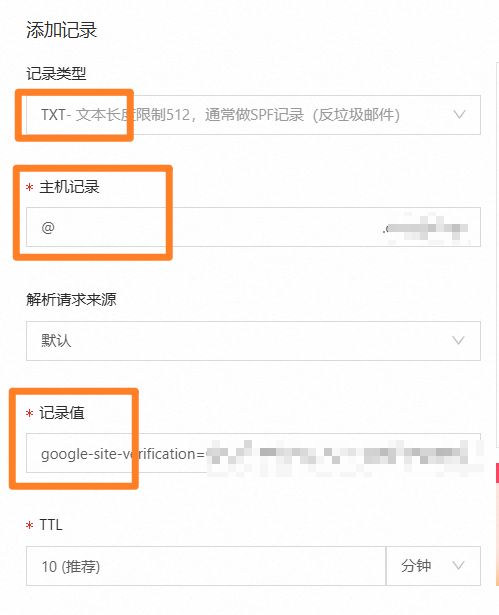
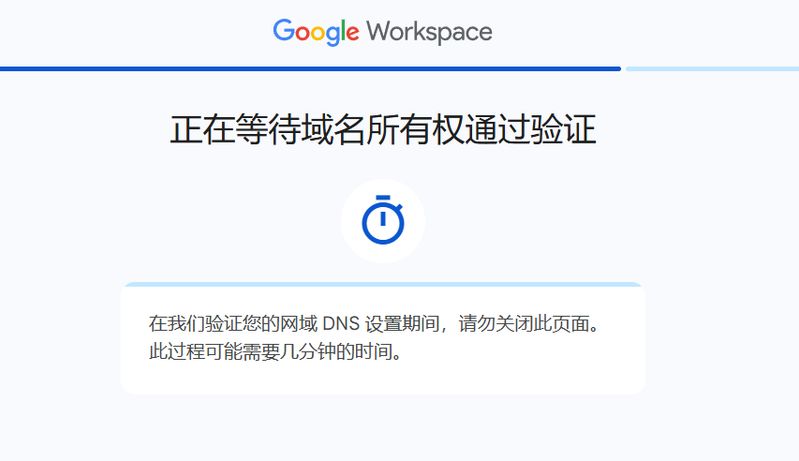
22. When the resolution is completed, go back to the google page and check the bottom for confirmation。

23. The addition of the decryption will take a few minutes before it becomes effective。
If the display fails, it indicates that there is an error in the resolution and check the previous step. Either the type or the value of the resolution is wrong, or the platform needs you to do a real name or something before the resolution becomes effective。
If you show success, click continue。
24. Validation of domain names enabled the use of gmail, the business mailbox that we have just registered。
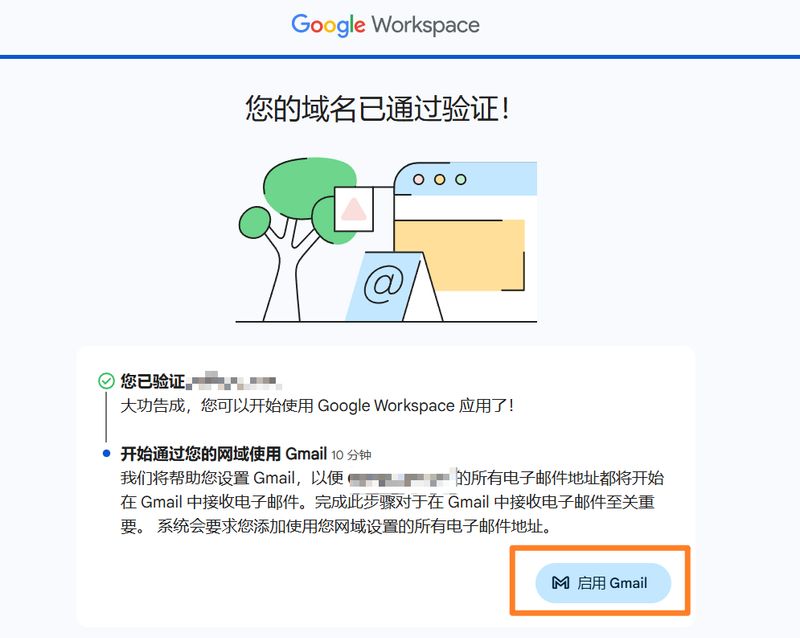
If your team needs multiple mailboxes, click " create " to create multiple mailbox accounts. The creation of multiple mailboxes would lead to additional costs, with some small partners assuming that multiple mailboxes under a domain name would also be $6 per month, which is an error。
I used google enterprise mailbox to send development messages, so i just needed one mailbox to click "continue activation."。
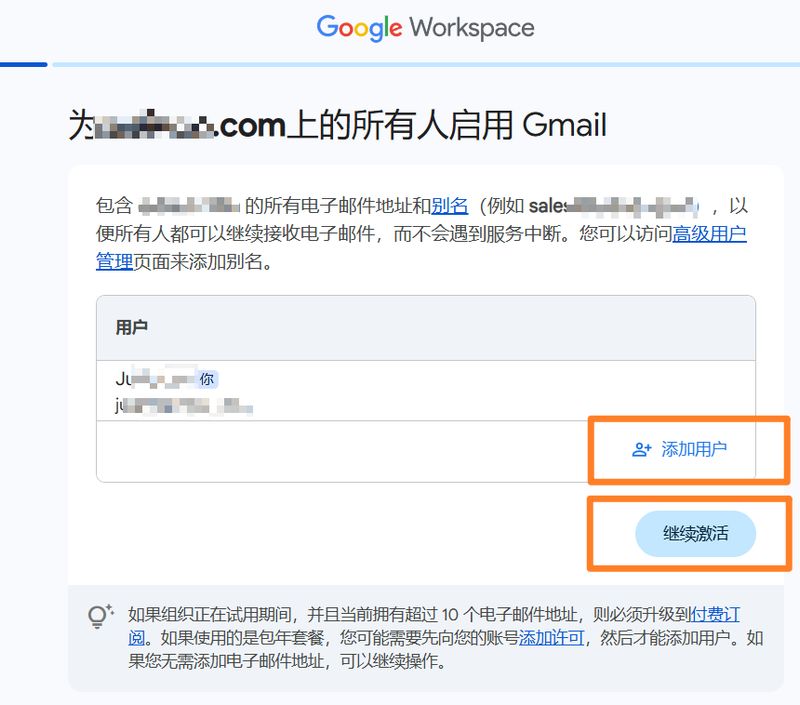
25. The next step was to add a decomposition to the domain name. We still show the process of manually adding the resolution。
This time the mx record is to be added. Click the key in the box below to get the resolution information。
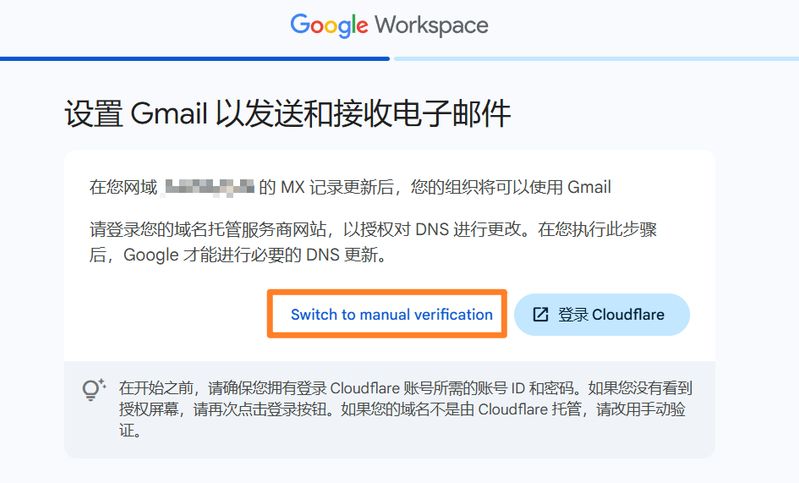
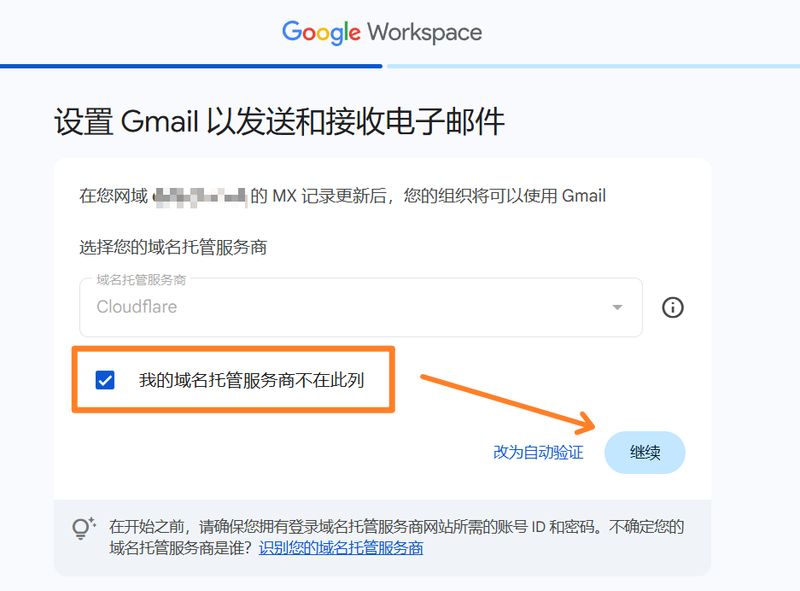
Once the mx resolution information has been obtained, add a resolution to the domain name resolution interface, taking into account step 20 above。
This time, one more priority has to be filled in。
After completion of the reconciliation records, check and confirm against step 21 above。
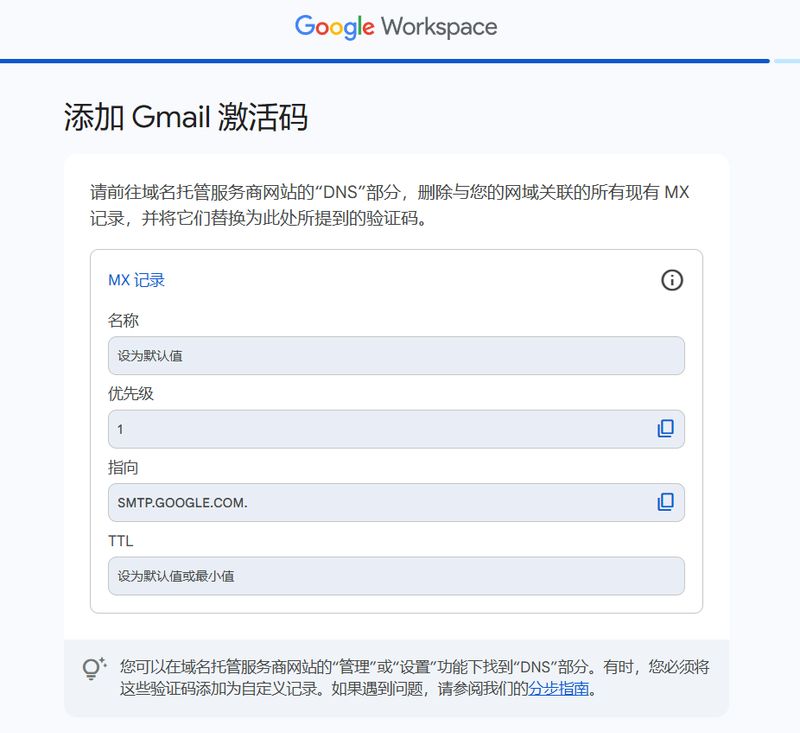
27. Once this analysis has been completed, it has been completed. Click [exploring google workspace] to answer a few questions。
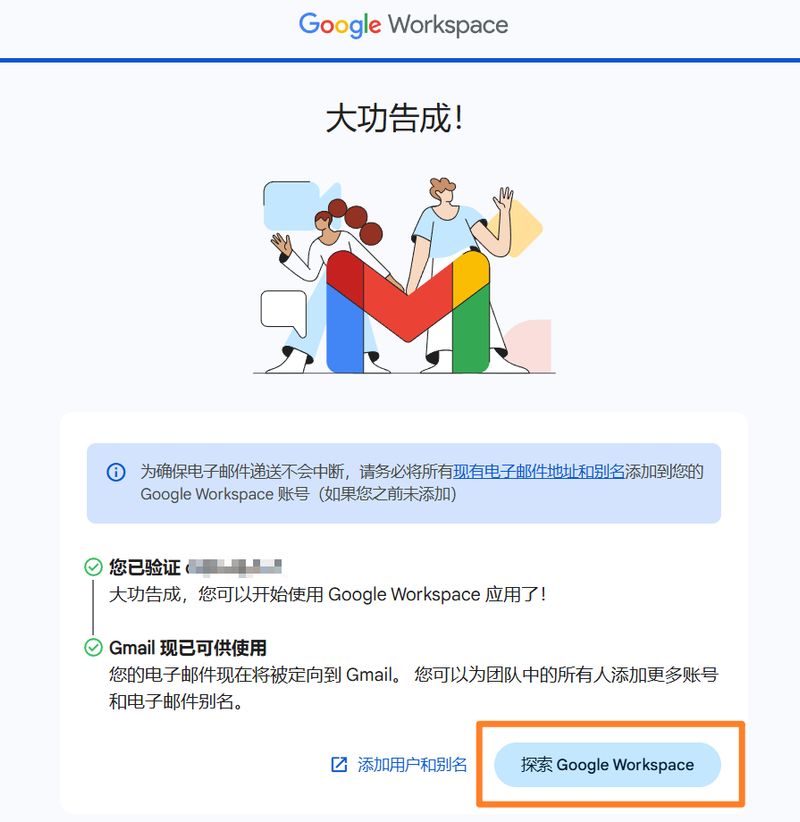
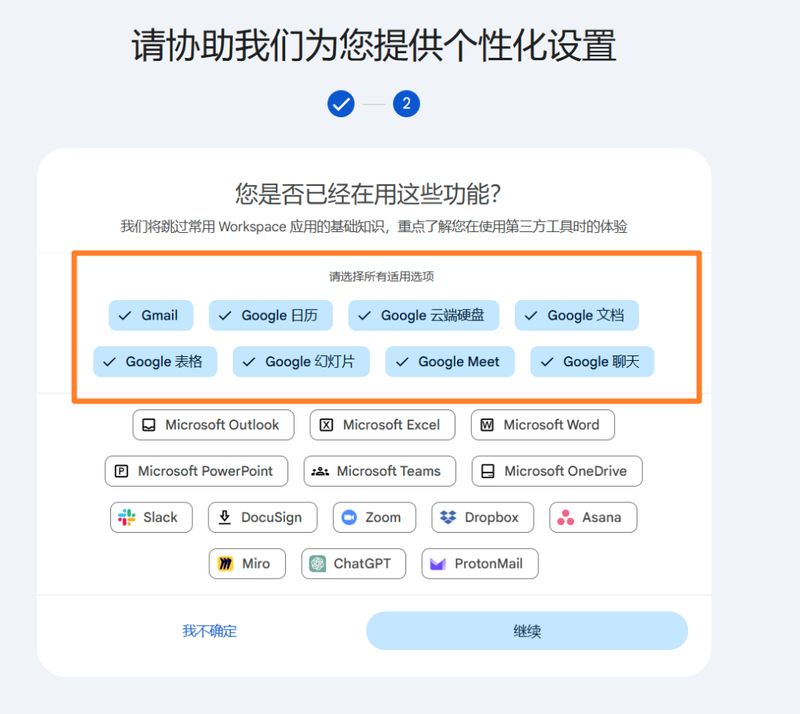
28. Common functions are selected. Google workspace is not just a mailbox service, but also a variety of functions, and the functional suggestions i have outlined below are selected. The use of google clouds, google tables, google meetings is very popular with foreign clients。
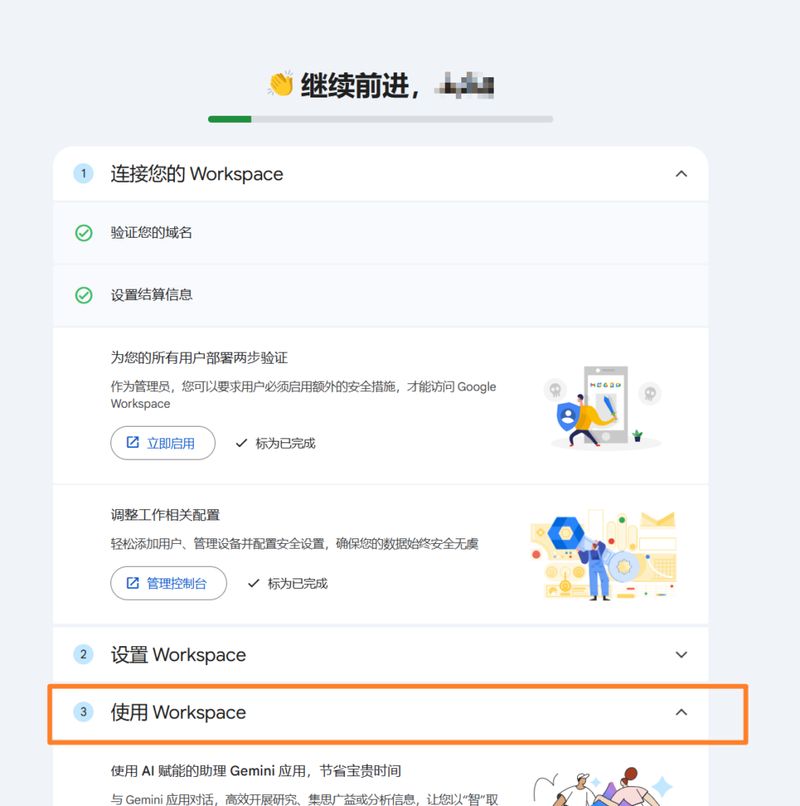
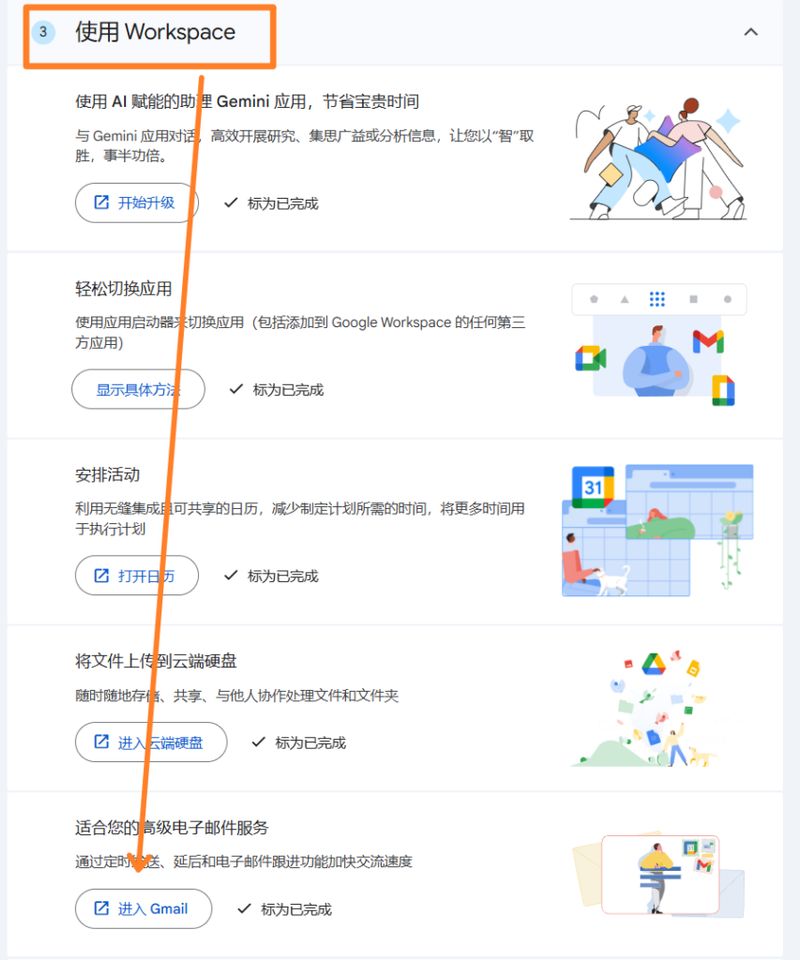
29. Following the next graph steps, access to the mailbox interface。
The last step in the register box is to be followed by a check-out test。
A newly registered mailbox sends an e-mail to its old mailbox and then replies, and if everything is normal, the registration process is successfully completed。
Google enterprise mailbox 1. How do i use google enterprise mailbox
The back office of google enterprise mailbox has access to https://admin. Google. Com
Mailbox login address is https://gmail. Com
The former are the main account management mailboxes, such as the creation of sub-mails, the upgrading or downgrading of fee packages, and the addition of security protection measures。
The latter is for mail, and of course you can tie the mailbox to the mailbox management software。
Why do i always have to verify the account number
Don't switch the lines of the science web frequently. The frequent switch-off of the scientific access line will make google think you've stolen the number, and will require you to re-validate mail access。
Can i register on a computer several google business mailboxes
A computer can easily access google enterprise mailboxes with multiple domain names without fear of sealing. But each google business mailbox needs a different cell phone number。
4. What is the ceiling for the daily distribution of google enterprise mailboxes?
Google business mailbox has a maximum of 2,000 mails per day, but can you really send so many emails every day
Don't do this. Don't send a group of development letters, even 30 a day, without any means of protection. Otherwise, your e-mail service will continue to decline until the mailbox is destroyed。









