


An android application signature is one of the important steps in the application packing process, and google requires that all applications must be signed before they can be installed in the android operating system. Android's signature mechanism also facilitates developers to identify and update their own applications. This paper attempts to provide a simple analysis of android's use of signature mechanisms, with limited personal understanding and inevitable omissions。
Background
In order to figure out exactly what an android application is, some background is needed first。
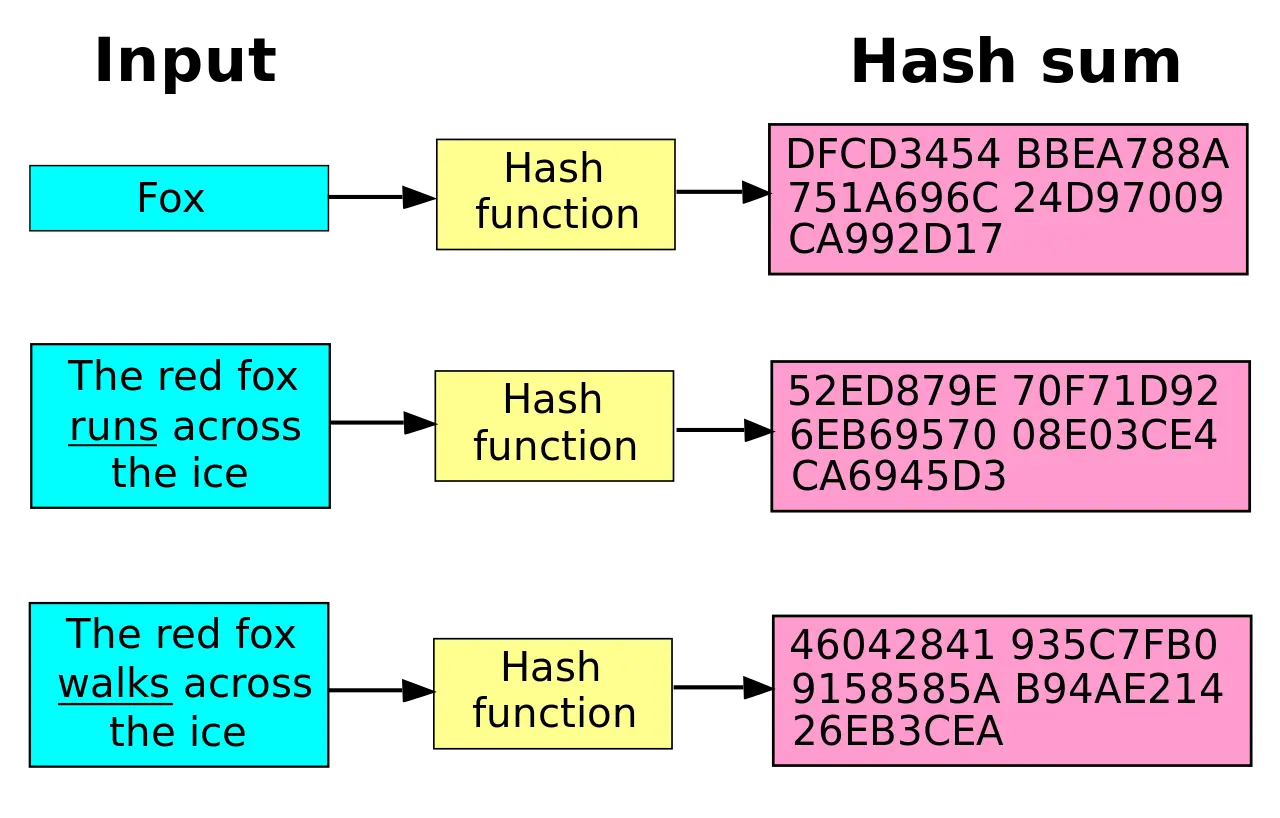
Digital digest
The main function of the digital summary is to use a single-way hash algorithm to summarize information of any length into a set of secret texts of a fixed length. Common hash algorithms include sha-1, sha-256, md5 and so on, and md from md5 is message digest. The summary of numbers is sometimes referred to as digital fingerprints, summaries of messages, etc., which in fact means one thing. It has three characteristics:
Keystore file
Android signatures require a suffixed file named keystore. When playing the debug package, if not specified in the bild. Gradle file, gladle will automatically generate a keystore file for us, stored in the system root directory . Android folder, under the name debug. Keystore. We will use it as an example to see what the keystore file contains。
Viewed through the keytool tool, the default password is "android." $keytool-list-v-keystore debug. Keystore-storepass android results are as follows:
Key library type: jks
key library provider: sun
your key library contains 1 entry
alias: androiddebugkey
created: 2013-4-26
entry type: privatekeyentry
certificate chain length: 1
certificate [1]:
owner: cn=android debug, o=android, c=us
published by: cn=android debug, o=android, c=us
serial number: 517a38f2
valid from fri apr 26 15:46:58 cst 2013 to sun apr 19 15:46:58 cst 2043
could not close temporary folder: %s
md5: 37:09:10:a9:f1:ae:9c:e4:c0:85:b9:35:d9:93:93:52
sha1: f1:60:3f:72:2a:f2:3a:bc: 1c:b:f6:f4:5b:f4:fd:5e:34:8c:01:a9
sha256: 86: c7: cb: d1:56: e7: d8: b8: ad: 67: a7: a1: 8f: c0: f6: e6: fc: e1: 3d: 45: ae: bc: f5: df: b4: a9: f9: 9a: f7: 89: f7: 0d
signing algorithm name: sha1withrsa
main public key algorithm: 1024-bit rsa key
version: 3
As you can see, keystore is in fact like a key warehouse, which contains information on the owner and issuer of the certificate, contains information on the private key and the public key, and is password-protected. What's public and private。
Public key system rsa
Public and private keys are concepts in the public key system. All the encryption algorithms originally belonged to symmetric encryption, that is to say, the same password used for encryption and encryption, and how communications could be safely communicated and passwords kept, which was the main difficulty of such encryption. There's no teammates。
In a public key system, encryption and decryption use different keys, referred to as public keys and private keys, which mean that everyone can know, private keys are held only by the owner and cannot be derived from existing computing capabilities alone. As a result, there is no question of leaking the key during communication, and communications remain secure as long as the private key is not leaked。
Public key systems can be described as the most important key systems now and one of the cornerstones of the internet。
Public key systems can be used for encryption or signature. Encryption programs do not want anyone to know my message, so the public key is used to encrypt information, and the private key is used to decrypt information; and signing programs do not want someone to impersonate me to send the message. Only i can publish the signature, so they need to be signed with a private key, which is used to verify the signature。
What's an application signature
Back to the point, let's see where android's application of signatures took place。
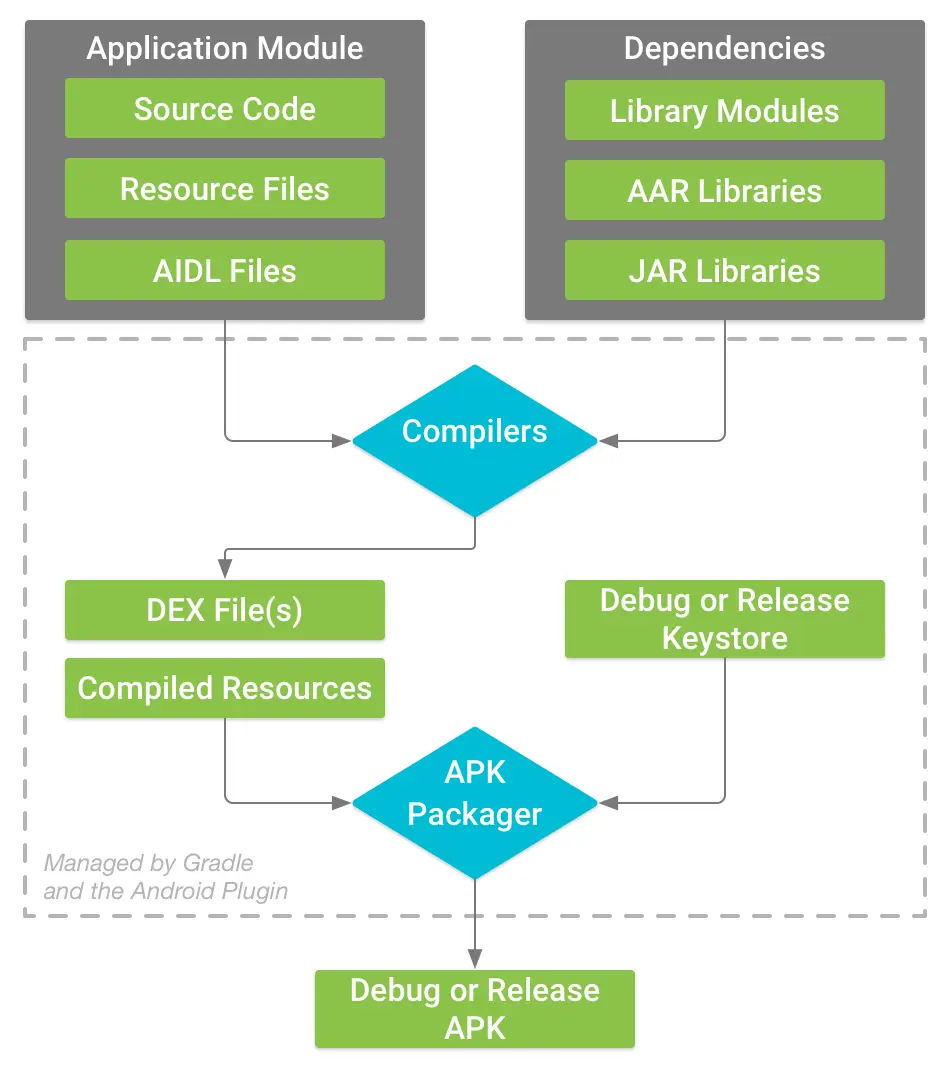
In the process of compilation, the compiler will first compile the source code and resources, generate the dex file and some compiled resource files, and then apk manager will sign the files using the keystore file according to configuration, before signing all the resources into a zip package, which actually contains the apk files that we used to install. You can see that the signature occurs when the construction is essentially complete。
Signing process
So how did the apk manager use keystore to sign? We'll see what happens step by step。
Scan all files generated after they are compiled. Each file generates a digital summary that is stored in mEta-inf/manifest. Mf file
Name: res/drawable-xhdpi-v4/im ic keyboard pressed. Png
sha-256-digest: cqjoi3guv9o0ibFgLolijuztbwycpcwbxis/o6tmftc
name: numbers. Dex
sha-256-digest: fjcwlv1tyzul1qxkdsj6bxtmaskk+jkkt5zmpdb8tg=
Let's see how i ic keyboard pressed. Png is actually calculated by the numerical summary of this document。
I don't knowI'm sorry- a-a256 im ic keyboard pressed. Png72a8ce8b7814bfd3b2017e02ce948254653070c823dc59b5c8b3fa3a4cc7d37 im ic keyboard pressed. PngI don't know I don't know, echo "72a8ce8b7814bfd3b42017e02ce948254653070c823c59b5c8b3a4c7d37"I don't knowPleaseCqjoi3guv9o0ibfgloilijuztbwycpcwbxis/o6tmftc=You can see the values we see in the manifest. Mf are right. 2. Generate a digital summary of the manifest. Mf file and write to the certt. Sf. Here is a detail that, in addition to the entire document hash, separates the file into multiple sections to calculate hash as well in the certt. Sf file [why, not clear] 3. Compute a digital summary of certt. Sf and encrypt it with rsa private key to create signatures 4. Write signatures, public keys, hash algorithm information to the cert. Rsa file and add these files to the apk compression package mEta-inf in directory
The current application does not require a certificate issued by the certificate authority, and the developer can create a self-signed certificate through the keytool。
Why did you sign it
Applying the signature does not guarantee that the apk will not be tampered with, just to be able to verify whether the apk has been tampered with. During the installation of the system, if the aapk is found to have been tampered with, the installation will fail. How does the system verify it
Sign verificationProcess system to obtain a public key saved in installed apk to decrypt the signature information saved in certt. Rsa in the new apk; compare the cert. Sf file calculation summary to the information declassified in the previous step, if inconsistently indicates that certt. Sf has been tampered with, refuses to install the manifest. Sf file calculation summary compared to the information in the certt. Sf file, if inconsistent, indicates that the manifest. Sf file has been tampered with, refuses to install a digital summary of all other documents in apk, and if the document does not appear in manifest. Sf or the summary is different from that contained in manifest. Sf, indicates that a new document has been added or the document has been tampered, refuses to install
Throughout the verification process, round and round, from certt. Rsa - certt. Sf - > manifest. Sf - > all other files, the installation of apk will be terminated.
If a new signature document is assigned to the new version of the application, the name of the package will have to be changed if the system is to be considered a different application. Otherwise the installation will fail and the signature will not be consistent. Install parse failed inconsistent certificates
Other uses of signature
In addition to the verification applications for installation, there are other uses for the signature。
Apply modularization. Android allows two applications with the same signature to use the same linux userid so that both applications can share data storage. At the same time, if the application is applied, the two applications can also operate in the same process. This approach allows modular deployment applications and individual modules to be upgraded independently. It is possible that many thematic resource packs have been installed in this way。
I'm sorry
        I'm sorry="http://schemas. Android. Com/apk/res/android"
        Android: shareduserid="com. Meng. Sharedappid."
        Package="meng. Mainuicoponents">
Shared code data. Android provides the capability to share the code between applications using the same signature. Another premise is that two applications set up using the same shareuserid. You can use the package name to get to the brother apc context, and then get to the classloader class to load the brother app, and you can sample and use a reflection to call for a specific method。
ValI'm sorry, friendcoNtext =This. CreatepackagecoNtext()"packagename", context. Context include code)ValFriendsclass = friendcontext. Classloader. Loadclass"packagename. Classname"I'm not sureVal= arrayof>()/ say the fight (funactionname)You're not going anywhere"functionname"*noparams. Invoke. Newinstance(),That's itI'm not sure 








